January 16th, 2026
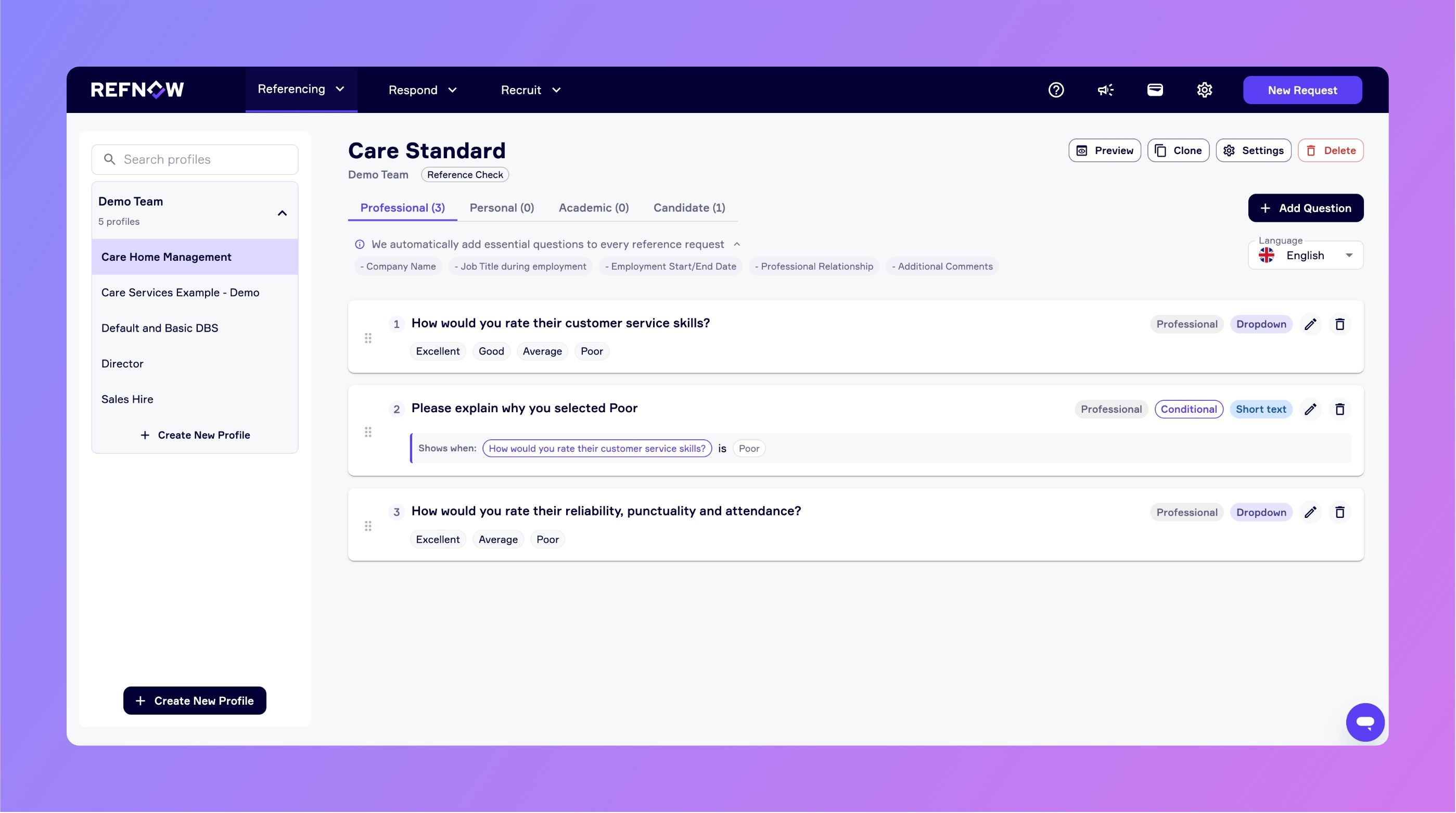
✅ Smarter References: Conditional Questions Now Available!
We're excited to introduce Conditional Questions to RefNow, giving you the power to create dynamic reference forms that adapt based on referee responses.
What's New?
You can now create questions that appear or hide automatically based on answers to previous questions. Set up conditions using AND/OR logic to show questions only when relevant.
Example Use Cases
Example 1: Management Experience
Question: "Did they have direct reports?" → If "Yes", show: "How many people did they manage?"
Example 2: Performance Issues
Question: "Would you rehire them?" → If "No", show: "What were the main reasons you wouldn't rehire them?"
Example 3: Specific Skills
Question: "What was their primary role?" → If "Sales" or "Business Development", show: "What was their average monthly sales target?"
These new capabilities help you reduce form fatigue, gather deeper insights, and create more focused reference experiences.
How to Start Using Them
Head to the Question Profiles page and edit or create a new question. You'll see a new "Add Conditional Logic" option where you can:
Select a previous Dropdown or Radio List question to depend on
Choose an operator and answer value(s) that trigger the question
Add multiple conditions using AND/OR logic as needed
Questions with conditional logic are clearly marked, and you can preview your question flow to test conditions before going live by clicking Preview → Preview Questions.
Learn more about using Conditional Questions in this article.
Built with Your Input
This feature was developed based on feedback from our users who wanted more flexibility in creating personalised reference experiences. If you have ideas for what we should build next, we'd love to hear from you - visit Settings → Feedback in the app to send us your suggestions.